Questions during the meeting
Using the AI's suggested questions without losing the thread.
-
The three kinds of card
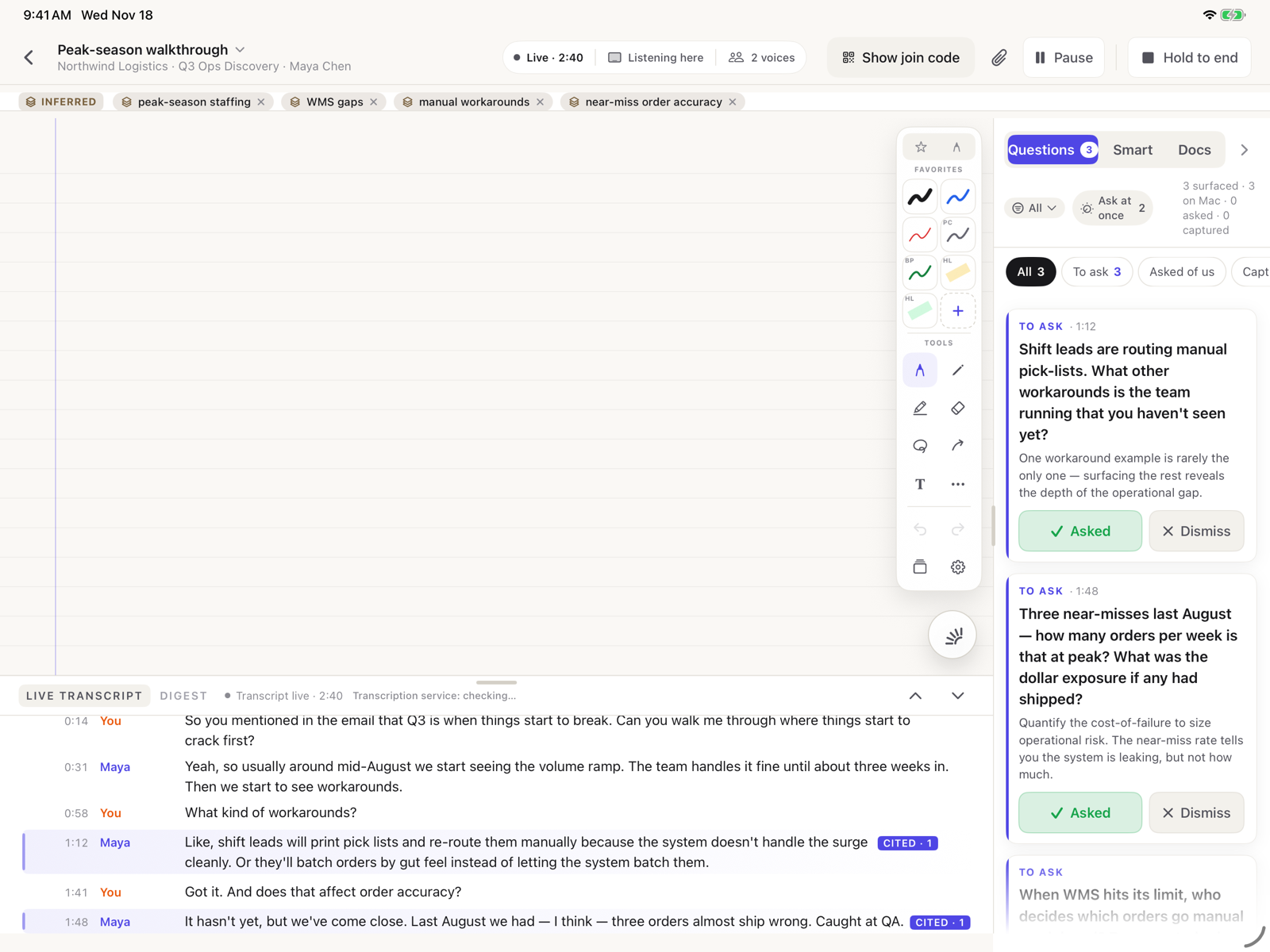
In the Questions tab, filter with All, To ask, Asked of us and Captured.
- To ask: a question you should ask. It shows why it matters and the moment in the meeting.
- Asked of us: a question someone put to you, with a SUGGESTED ANSWER under it.
- Captured: something written down but never asked, like an action item, a deliverable or a decision.
One topic shows at a time. Ask at once sets how many important questions show per topic. The rest wait under More on this topic. Questions from earlier topics fold into Other topics.
-
Evidence
Each card shows a reason and a time, not the quote. To keep the exact words, open the card's menu and choose Copy with quote and time. In Review, each claim in the write-up links back to its moment (chapter 6).
-
Mark a question
- Asked (on an Asked of us card: Answered): tap the button, swipe the card right with a finger, or use the card's menu. It marks the card for everyone in the meeting and tells Consult what you covered.
- Dismiss: swipe left. Only you see this.
- Not useful and Good question: in the card's menu. They tune later suggestions. Only you see these.
- Save for follow-up: brings the card back in your next meeting on this project.
- Pin until asked: keeps the card where you can see it.
- Undo shows briefly after any of these.
Hold a card for the menu. What these do explains each choice. Covered cards collect under Covered.
-
Ask during the meeting
- Chat: if your workspace has it, the Questions panel has Cards and Chat at the top. Chat opens a private chat that uses this meeting as context. Only you and Consult see it.
- Ask from your notes: circle ink with the Lasso and use the first command in the bar.
- The chat stays closed until you open it. Nothing from it appears on your page.
