Take notes by hand. Consult does the listening.
You write with Apple Pencil, the way you always have. Consult transcribes the meeting, suggests the next good question, and writes it up when you're done.
Shift leads are routing manual pick-lists. What other workarounds is the team running that you haven't seen yet?
One workaround is rarely the only one. The rest show how deep the gap goes.
Consultants. Discovery and client meetings, with the write-up done when you leave.
Sales. Ask about budget, timing and who decides before you hang up.
Students. Lectures turned into an outline that follows the slides.
Back-to-back calls. On a Mac, Consult hears both sides and has the action items ready.
Show transcript
- You're the one in the meeting.
- So take notes by hand.
- Consult listens, and suggests the next good question, with the reason behind it.
- Drag it into your notes, or ask it when the moment is right.
- Phones on the table become extra mics.
- On a video call, your Mac hears both sides.
- And when the meeting ends,
- the write-up is already done. Decisions, action items, and who owns them.
- Send it as a PDF, with your handwriting attached.
- Consult. The meeting notebook that listens.
Before: Walk in ready
Open the meeting and Consult has a call sheet waiting. It pulls what you need to know from the last meeting, the project and the agenda.
Short on time? Say what the meeting is about and Consult fills in the setup.

During: Ask the question that matters
Consult follows the conversation and suggests questions as it goes. Each card says why it's asking and when it came up, so you can judge it at a glance. Near the planned end, Before you hang up gathers what you still haven't asked into one list.
After: The write-up is already done
When the meeting ends, you get a summary, decisions, action items with owners, open loops and next steps. Every line links back to the moment it came from. Check it against the recording, then send it as a PDF or a Word file.

You're the one in the meeting.
Your handwriting is the record. Consult never changes it. Its questions and notes are suggestions, and you decide what to keep. It won't flag anyone as wrong while you're talking; checking facts waits until after the meeting.
Three apps, one meeting
-
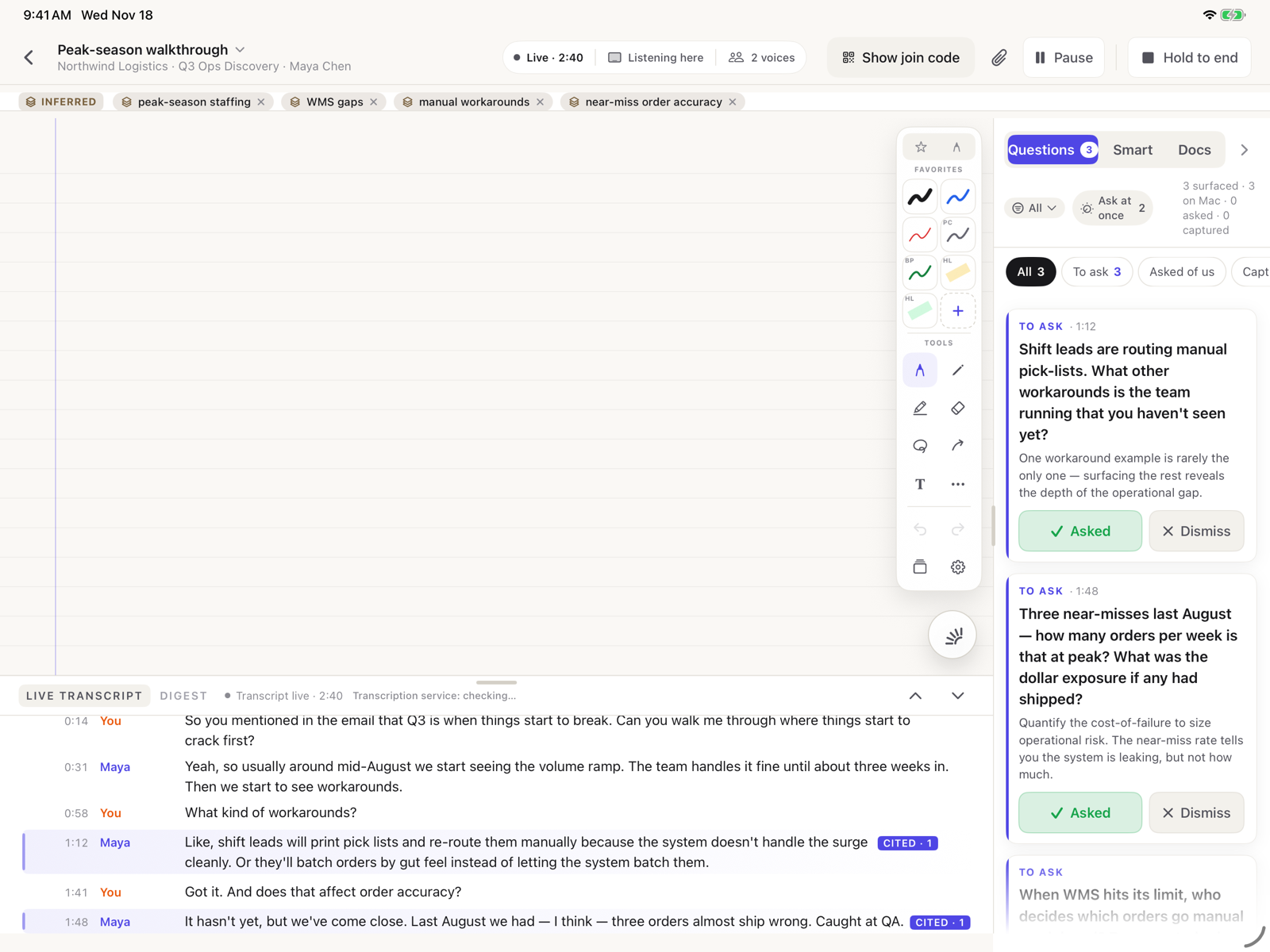
Consult for iPad
The notebook. Write on ruled pages with Apple Pencil, drag a question or a line of the transcript into your notes, and review it all after.
-
Consult for Mac
For video calls. It captures both sides of a Zoom, Teams, FaceTime, Webex or Signal call, starts when the call starts, and keeps its live windows out of your screen share.
-
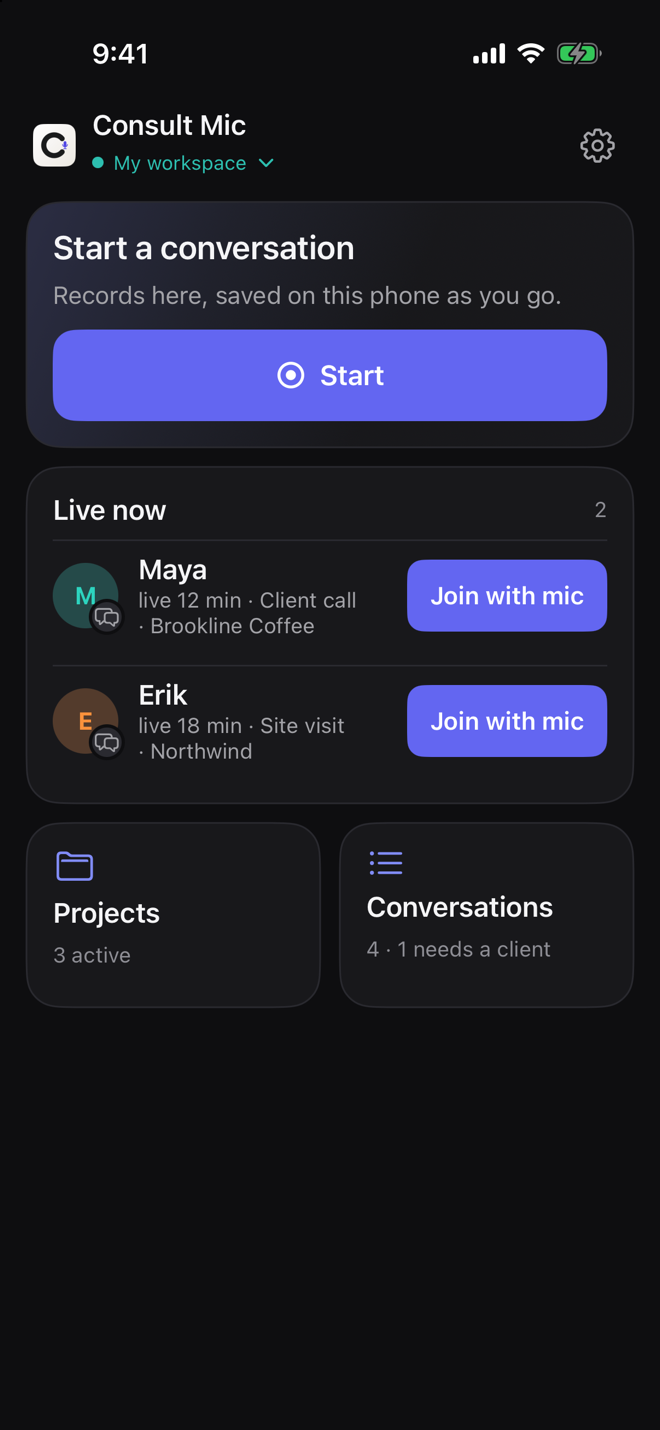
Consult Mic for iPhone
Phones become room mics. Scan a code and your phone helps Consult hear a big table or a lecture hall.


One workspace, everyone on the same page.
Share a workspace with your firm or your class. Meetings, projects and people live in one place, and new members join with a code. Each workspace keeps its own data and its own AI, separate from the rest.
In a lecture, Consult builds the outline from the slides and what was said, section by section.

Private by default.
Consult has no ads and no tracking, and it doesn't sell your data. Your meetings stay on your devices and in your workspace. AI services see them only to do the work you asked for.
Questions
What do I need?
An iPad with Apple Pencil is the heart of it. A Mac adds call capture, and any iPhone can be an extra mic.
Do I have to use Apple Pencil?
No. You can type notes too. Consult is built for the pen, though.
Does it record everyone?
Only when you start a meeting. Many places require everyone's consent to record, so tell the people in the room and follow your local rules.
What if the Wi-Fi drops?
Your notes and the recording keep going on the device. Consult tells you plainly when it can't reach the AI, and catches up when you're back online.
Can the AI rewrite my notes?
No. Your notes are never changed. The AI writes its own notes beside yours.
Who can see my meetings?
The members of your workspace, except meetings you mark personal.
Can I use it for lectures?
Yes. Consult turns a lecture into an outline that follows the slides, and classmates can lend their phones as mics.
How do I get it?
Consult is in a private beta. See below.
Consult is in private beta.
If you've been invited, open the invitation on your iPad or Mac. It takes you to Apple's TestFlight app first if you don't have it. Then open Consult and join your workspace with the link or code you were sent.
Not invited yet? Write to us and tell us how you'd use it.